Job Application Form
Job Application Form Download in English and Urdu (PDF)
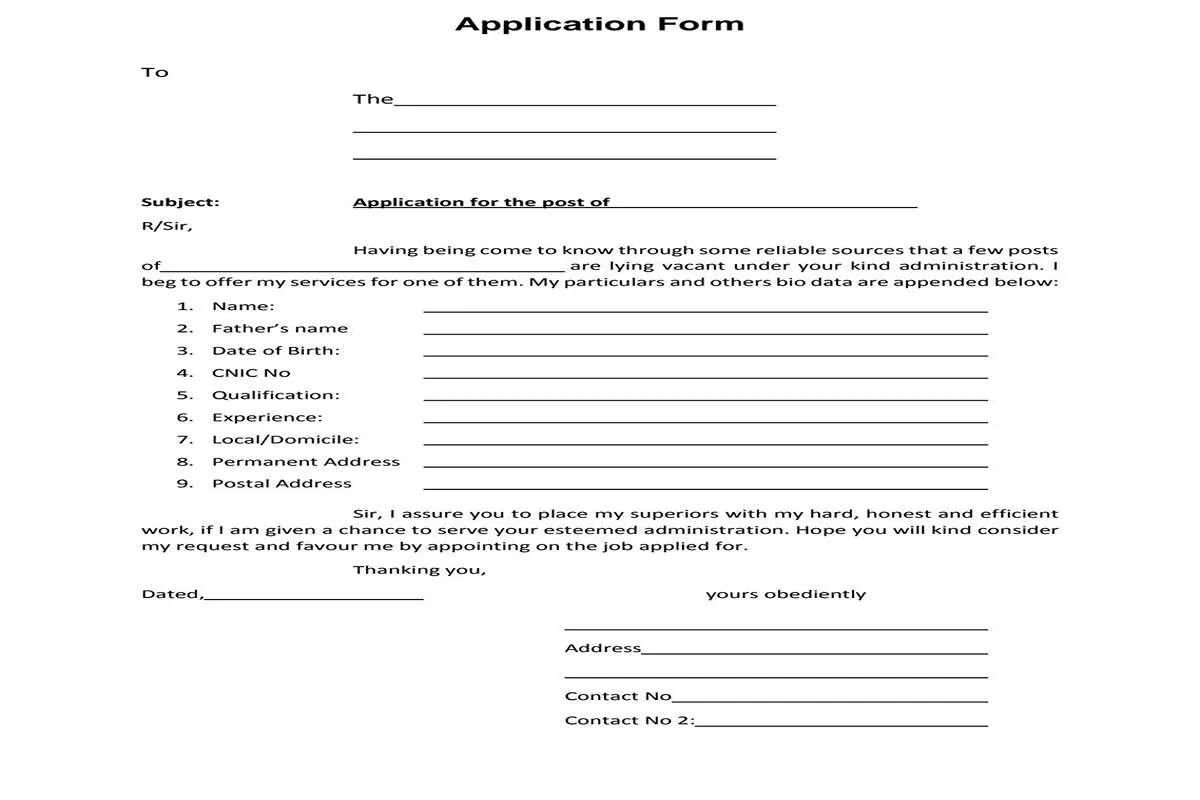
درخواست فارم پُر کرنے کا مکمل طریقہ کار ذیل میں دیا گیا ہے-👇۔
Job Application Forms Downloaded in PDF and Complete Filling Procedure
Download job application forms in PDF for government and private jobs in Balochistan and Pakistan. Learn how to fill out forms and apply correctly.
Many government departments, educational institutions, colleges, and other organizations require candidates to submit a written application when applying for advertised vacancies. To make this process easier, we provide downloadable application forms along with simple instructions on how to complete them correctly.
Candidates can download the available forms, print them if required, fill in their personal and educational details, and submit their applications according to the instructions provided in the relevant job advertisement.
How to Fill Out a Job Application Form—Step-by-Step Procedure
If you are applying for a government job or another vacancy that requires a handwritten application, follow the instructions below to complete your application form accurately.
Step 1: Download the Application Form
Find the relevant application form on this page and click the Download Application Form (PDF) link. The downloaded form is available in both English and Urdu formats. Save the file to your mobile phone or computer.
Open the PDF and read the application instructions carefully. If the form is designed for handwritten completion, print it on A4-size paper unless the recruiting organization specifies another paper size.
Step 2: Write the Recipient’s Details
At the starting point of the Job Application Form, write the name or designation of the officer or authority to whom the application must be submitted.
For example:
To: The Principal / Director / Head of Department
Use the actual designation and department name given in the official job advertisement. Do not guess the recipient’s name or address.
Step 3: Write the Subject of the Application
The subject line should clearly state the position for which you are applying.
Example:
Subject: Application for the Post of Junior Clerk
Replace “Junior Clerk” with the exact post title mentioned in the recruitment advertisement.
Step 4: Write the Opening Statement
If the form contains a standard application letter, complete the opening statement by mentioning the post for which you are applying.
For example:
I beg to offer my services for the post of [Post Name]. My particulars and other details are provided below.”
Make sure the post name is correct. If the department provides a prescribed application format, follow that format rather than changing its wording.
Step 5: Enter Your Full Name
Write your complete name in the Name field. Use the spelling shown on your CNIC and other official documents.
Avoid acronyms and misspellings that might interfere with verification.
Step 6: Enter Your Father’s Name
Write your father’s full name as recorded in your official documents. Check the spelling carefully before proceeding.
Step 7: Enter Your Date of Birth
Write your date of birth in the format requested by the form, such as DD/MM/YYYY.
For example: 15/08/1998.
Always use the date recorded on your official documents. Check the age limit specified in the job advertisement before applying.
Step 8: Enter Your CNIC Number
Write your Computerized National Identity Card (CNIC) number accurately.
For example: 12345-1234567-1.
The number above is only an example. Enter your own CNIC number carefully and verify every digit prior to submitting the application.
Step 9: Enter Your Educational Qualifications
Mention your educational qualifications according to the requirements of the post.
Depending on the available space, include details such as
- Matriculation
- Intermediate
- Bachelor’s degree
- Master’s degree
- Diploma or professional qualification
Write the qualification, relevant board or university, year of completion, and marks or grade, if requested. Do not claim a degree or qualification that you have not completed or cannot document.
Step 10: Provide Your Experience
If you have relevant work experience, mention the job title, organization, and duration of employment where the form permits.
If the form requires supporting evidence, attach the relevant experience certificates.
If you have no work experience, write “N/A” or “No Experience” if appropriate and permitted by the form. Do not leave a required field blank without checking the instructions.
Step 11: Enter Your Local or Domicile Details
Write the district and province shown on your domicile certificate or other relevant official record.
For vacancies restricted to particular districts, local areas, or provincial quotas, make sure you meet the advertised requirements.
Attach a domicile certificate only if the recruiting authority requires it.
Step 12: Write Your Permanent Address
Enter your complete permanent residential address, which is already mentioned in your CNIC. Include the house number, street or village, locality, district, and province as applicable.
Ensure that the information matches your official records where required.
Step 13: Write Your Postal Address
Provide the address where you can receive letters or official mail. If your postal address is the same as your permanent address, follow the form’s instructions on whether to write “Same as above.”
Step 14: Write Your Contact Numbers
Enter your active mobile number in the Contact No. field.
If the form provides a second contact number, enter an alternative number that you can access or that belongs to a trusted contact with their permission.
Step 15: Write the Closing Statement
If the form contains a standard closing statement, read it and complete any blank fields without changing the official format unnecessarily.
The closing statement usually expresses the applicant’s willingness to serve the organization honestly and efficiently if selected.
Step 16: Write the Date and Sign the Application
Enter the date on which you complete or submit the application, as required by the form.
Sign your application wherever a signature is requested. If the form requires a handwritten signature, sign it yourself rather than typing your name.
Step 17: Attach the Required Documents
Check the official advertisement to determine which documents must be attached to the application. These may include:
- CNIC copy
- Domicile certificate
- Educational certificates and transcripts
- Experience certificates, where required
- Recent passport-size photographs
- Professional certificates or licenses, if applicable
- Application fee receipt or bank challan, if required
Submit only the documents requested by the recruiting authority, and ensure that the copies are clear and understandable.
Step 18: Review the Application Before Submission
Before sending your job application forms, check all the information thoroughly.
Confirm that your name, father’s name, date of birth, CNIC number, qualifications, domicile, addresses, and contact numbers are correct.
Make sure you have signed the form, attached the required documents, and followed any instructions about photographs, envelopes, fees, or attestations.
Here are the most useful links.
Step 19: Submit the Application to the Correct Authority
Submit the completed application using the method stated in the official advertisement. Depending on the department, job application forms may need to be delivered by post, submitted in person, or uploaded through an official online portal.
Check the correct submission address, required delivery method, and closing date before sending the application. Keep a copy of the completed form and any proof of submission for your records.
Important Instructions for Job Applicants
- Read the official job advertisement before completing the application form.
- Use the correct form for the advertised position.
- Provide accurate information and do not submit false documents.
- Check the age limit, educational requirements, domicile restrictions, and experience requirements.
- Attach all mandatory documents and follow the stated application procedure.
- Submit your application before the closing date.
- Never pay an unofficial person who promises guaranteed employment.
- Verify any application fee and payment instructions through the recruiting authority.
Explore More Jobs and Career Resources
Visit QuettaJob.com for the latest job advertisements, BPSC jobs, teaching vacancies, admissions, scholarships, past papers, and test preparation resources. Our aim is to help job seekers access useful career information and prepare their applications with greater confidence.
Frequently Asked Questions About Job Application Forms
1. Are these job application forms free to download?
Yes, the English and Urdu PDF templates provided on this page are available for free download.
2. Can I use these forms for every government job?
No. Some departments require their own prescribed application forms. Always check the official advertisement before using a general template.
3. Can I fill out the application form on my mobile phone?
You may be able to enter information using a PDF editor. However, if the form requires handwritten information or a physical signature, print it and complete it as instructed.
4. Should I fill out the form in English or Urdu?
Use the language and format accepted by the recruiting organization. If the advertisement specifies a language, follow that requirement.
5. How do I download a PDF application form?
Click the download link for the required form. Depending on your browser and the link settings, the PDF may download automatically or open in a new tab, where you can use the download option.
6. Can I apply without work experience?
You can apply if you meet the advertised eligibility criteria and experience requirements. Some positions require experience, while others do not.
Disclaimer: QuettaJob.com is an employment information platform and is not necessarily affiliated with the departments or organizations whose application forms are shared on this page. Candidates should verify the validity of forms, eligibility criteria, deadlines, fees, and submission instructions with the relevant recruiting authority before applying.